Lost/Stolen Registration – Benefits, Process, and Fees
Losing a mobile phone or having it stolen is not just about the cost of the device; it also puts your personal data, contacts, banking apps, and private information at risk. To address this issue, the Nepal Telecommunications Authority introduced the Mobile Device Management System (MDMS), a system designed to control and track mobile devices operating in Nepal.
Through the Lost/Stolen Registration feature, users can officially report their missing phone and request the blocking of its IMEI number, preventing unauthorized use on Nepali networks. Understanding this process is essential to secure your device and reduce the chances of misuse. In this guide, we will walk you through everything you need to know about reporting and registering a lost or stolen mobile phone under MDMS.
What is MDMS Lost/Stolen Registration
MDMS Lost/Stolen Registration is an online service provided by the Nepal Telecommunications Authority (NTA) that allows users to report lost or stolen mobile phones, allowing them to be blacklisted and tracked. Police investigations are made easier if the device is used with a new SIM card, because this system identifies it.
Who Must Register in MDMS Lost/Stolen?
The following individuals or entities in Nepal should register their device under the Lost/Stolen section of the Mobile Device Management System (MDMS):
- Mobile phone owners whose device has been lost.
- Users whose phone has been stolen and want to block the IMEI number.
- Individuals who legally purchased a phone in Nepal and have proof of ownership.
- Travelers or returnees who brought a phone from abroad and have already registered it in MDMS.
- Businesses or organizations that issued mobile phones to employees and need to block a missing device.
- Anyone who wants to prevent misuse of their personal data stored on the lost or stolen phone.
Registering the device promptly helps block network access and reduces the risk of unauthorized use.
Process of MDMS Lost/Stolen Registration
Follow these steps to report and block your lost or stolen mobile phone through the Mobile Device Management System (MDMS) in Nepal:
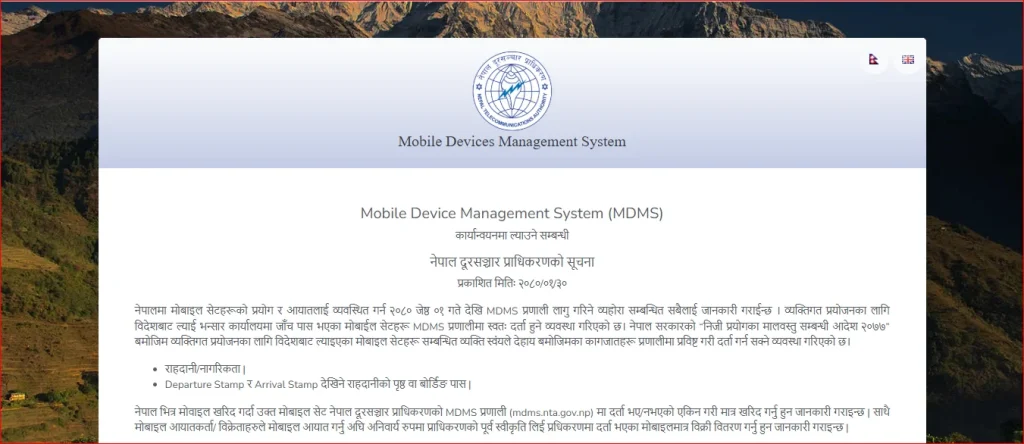
- Step 1: Visit the official website of MDMS.
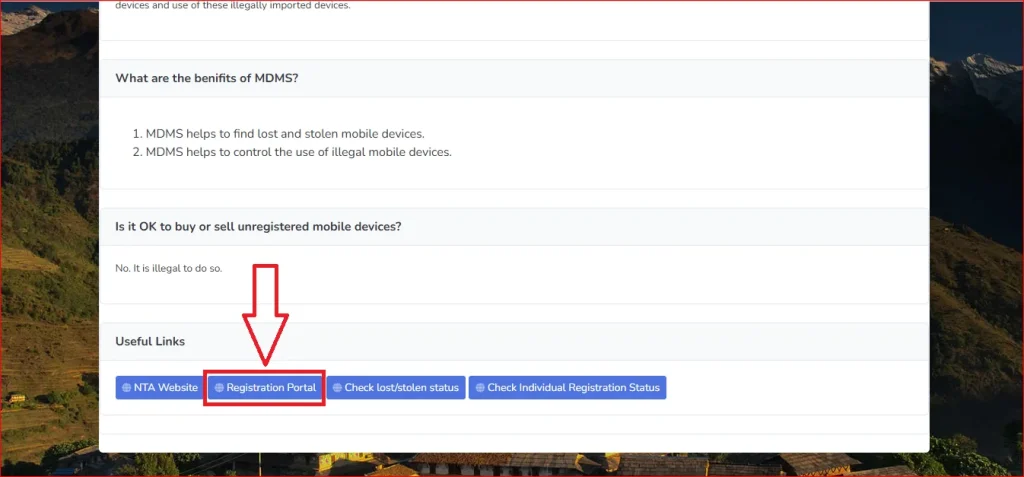
- Step 2: Scroll down and click on “Registration Portal.”
- Step 3: Navigate to the “Lost/Stolen Registration” button.
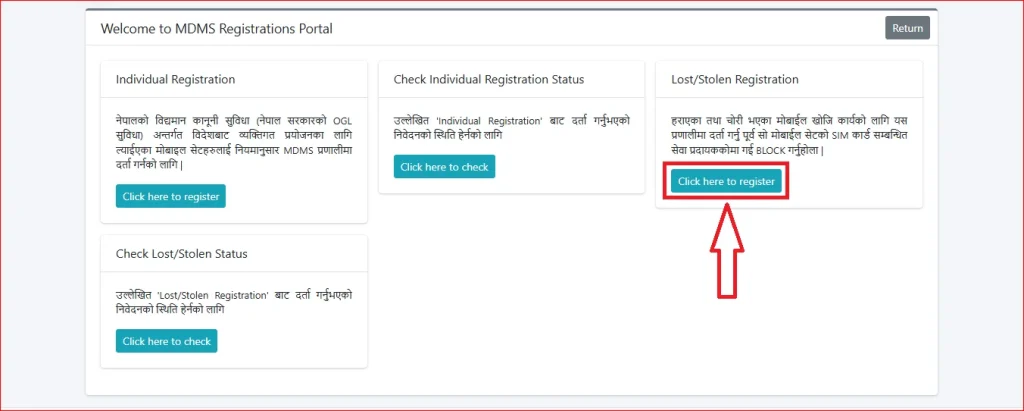
- Step 4: Enter your “Lost/Stolen Mobile Details.” Such as:
- IMEI Number
- Contact Number in Mobile
- Brand
- Model
- Lost/Stolen?
- lost/stolen Date
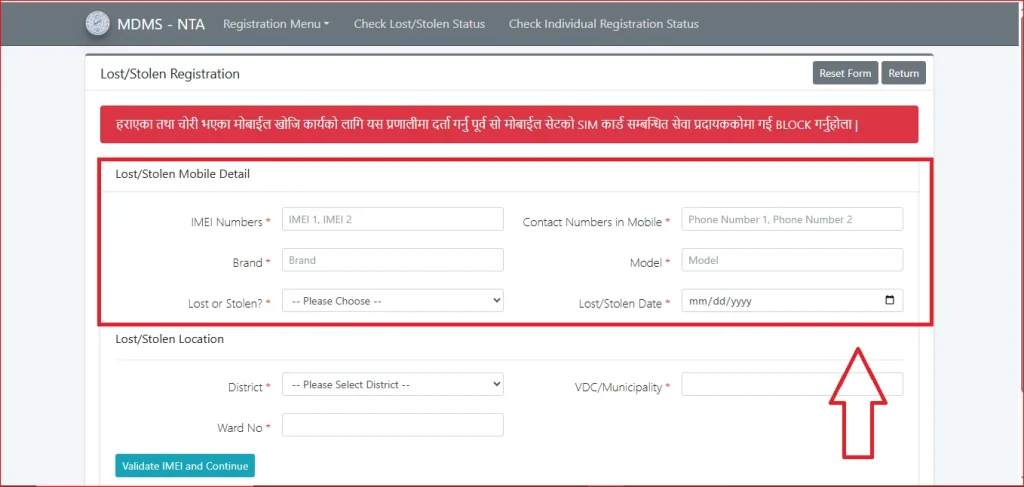
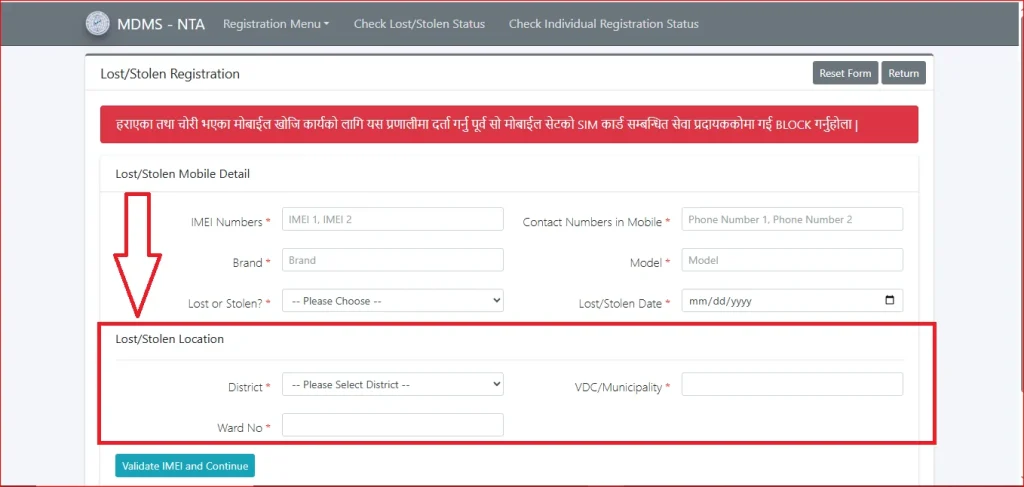
- Step 5: Enter your “Lost/Stolen Location.” Such as:
- District
- VDC/Municipality
- Ward No
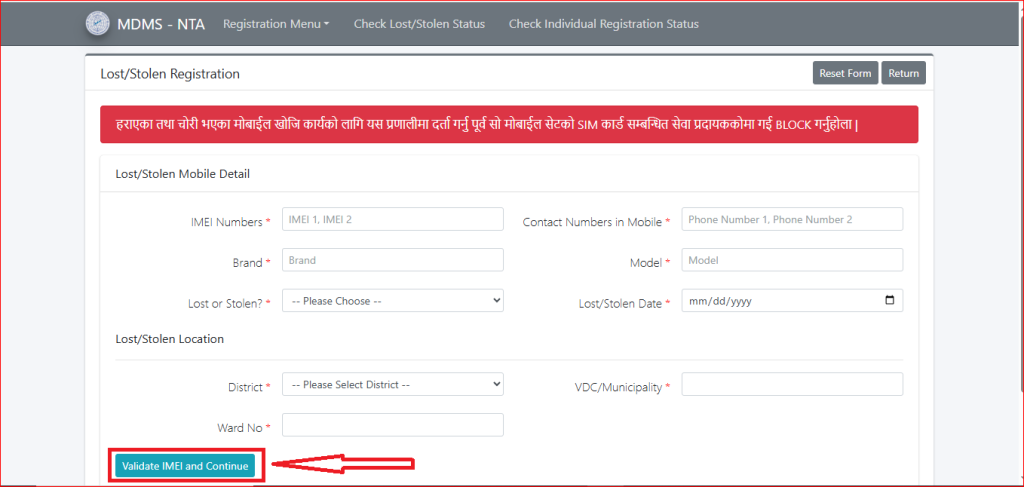
- Step 6: Click on “Validate IMEI and Continue.”
MDMS Lost/Stolen Registration Status Check
- Step 1: Visit the official website of MDMS.
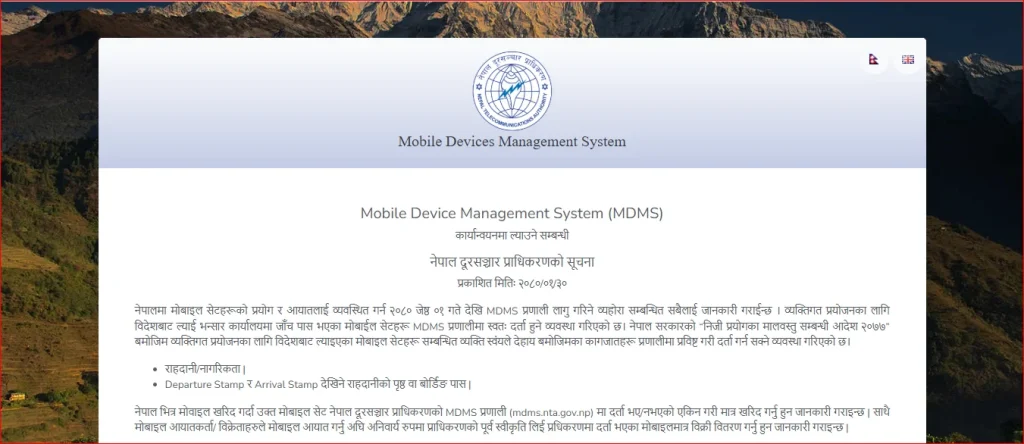
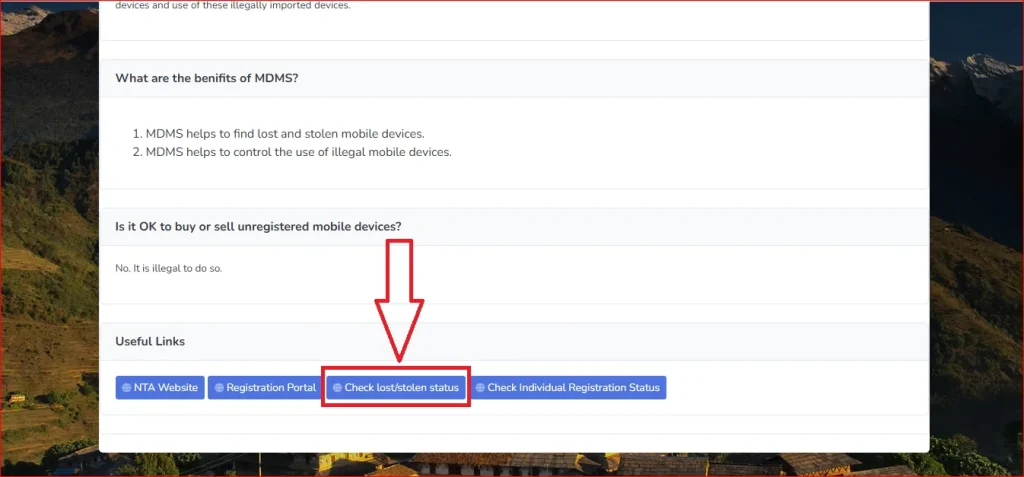
- Step 2: Scroll down and click on “Check Lost/Stolen Status.”
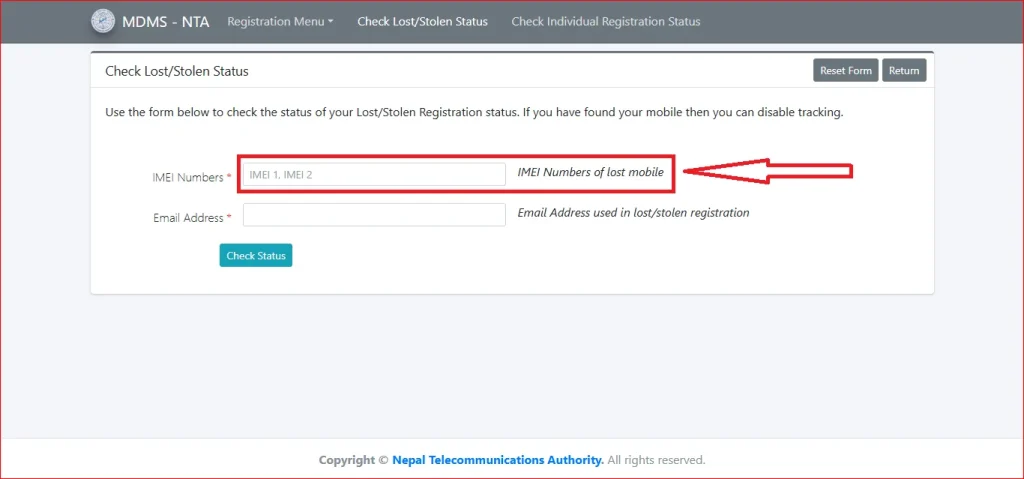
- Step 3: Enter your device’s “IMEI Number.”
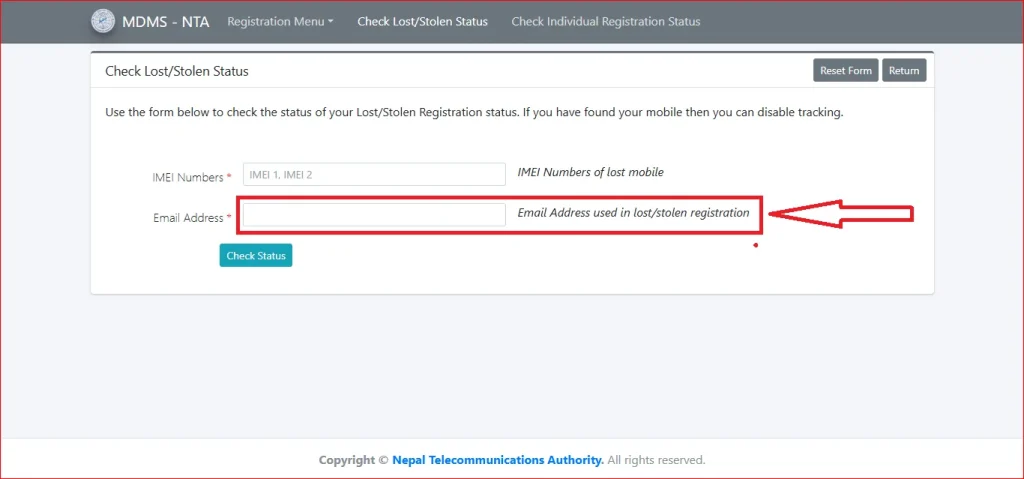
- Step 4: Enter your registered “Email Address.”
- Step 5: Click on the “Check Status” button.
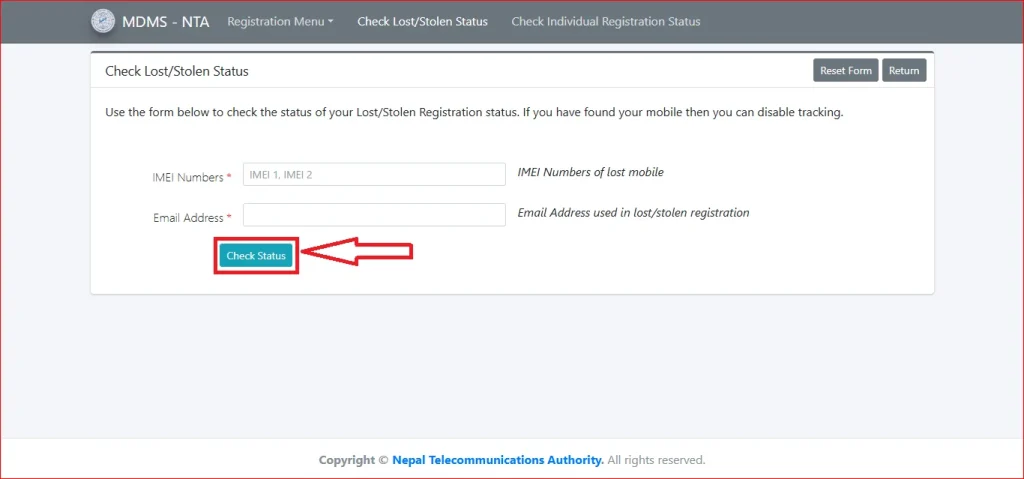
- Step 6: your device status will be displayed on your screen
MDMS Lost/Stolen Registration Fee
It is free to register a lost or stolen mobile device in the Nepal MDMS for the purpose of tracking or blocking it, which is provided by the Nepal Telecommunications Authority (NTA).
Benefits of Lost/Stolen Registration
Registering your lost or stolen mobile phone through the Mobile Device Management System (MDMS) in Nepal offers several important benefits:
- Prevents Unauthorized Use
Blocking the IMEI number ensures that no one can use your lost or stolen device on Nepali mobile networks. - Protects Personal Data
Helps safeguard your contacts, banking apps, messages, and other sensitive information from misuse. - Reduces Mobile Theft Incentives
Stolen phones become useless on local networks, discouraging thieves from targeting registered devices. - Simplifies Recovery Process
If the device is found, the registration record can help authorities return it to the rightful owner. - Legal Documentation
Provides official proof that you reported the device as lost or stolen, which may be required for insurance claims. - Peace of Mind
Knowing that your device is blocked and your data is safer reduces stress and uncertainty after a loss or theft.
Tips for Easy MDMS Lost/Stolen Registration
Registering your lost or stolen mobile device in the Mobile Device Management System can be smooth and hassle-free if you follow these tips:
- Keep Your IMEI Number Handy: Note down your phone’s IMEI number (*#06# on most devices) or keep a copy of the purchase invoice for quick reference.
- Prepare Required Documents in Advance: Gather necessary documents like your citizenship/ID, proof of purchase, and police report (if required) before starting the process.
- Use the Official MDMS Portal: Always submit your lost/stolen registration through the official MDMS website managed by the Nepal Telecommunications Authority to avoid fraud.
- Double-Check Information: Ensure your personal details, device IMEI, and documents are correct to prevent delays in registration.
- Submit Promptly: Report the lost or stolen device as soon as possible to block the IMEI and prevent misuse.
- Keep Confirmation Safe: Save or print the registration confirmation for future reference, insurance claims, or potential recovery.
FAQs About MDMS Lost/Stolen Registration
Conclusion
Losing or having a mobile phone stolen poses serious risks to your personal data and privacy. The MDMS Lost/Stolen Registration in Nepal provides an easy way to block your device, protect sensitive information, and prevent misuse. By promptly reporting a lost or stolen phone, users can secure their data, support recovery efforts, and gain peace of mind.